Controlled capture
Capture conditions, lighting and camera equipment are tailored to each artwork and its intended use.
DIGITAL ART REPRODUCTION · FOR THE FUTURE OF YOUR WORK
What happens to a successful artwork after the original has been sold?
DKR creates a high-quality digital foundation so you can decide later whether and how your work is reproduced with authorisation – for publications, high-quality prints or an edition of your own.
Digitise carefully today. Decide on the output later. You do not need to plan an edition yet.
hendrik peusch | DKR
We create a high-quality digital image of your original artwork, with careful attention to colour, detail and its distinctive visual character.
See the artwork. Discover its details.
For artists, galleries, publishers and collectors.
Take a closer look.
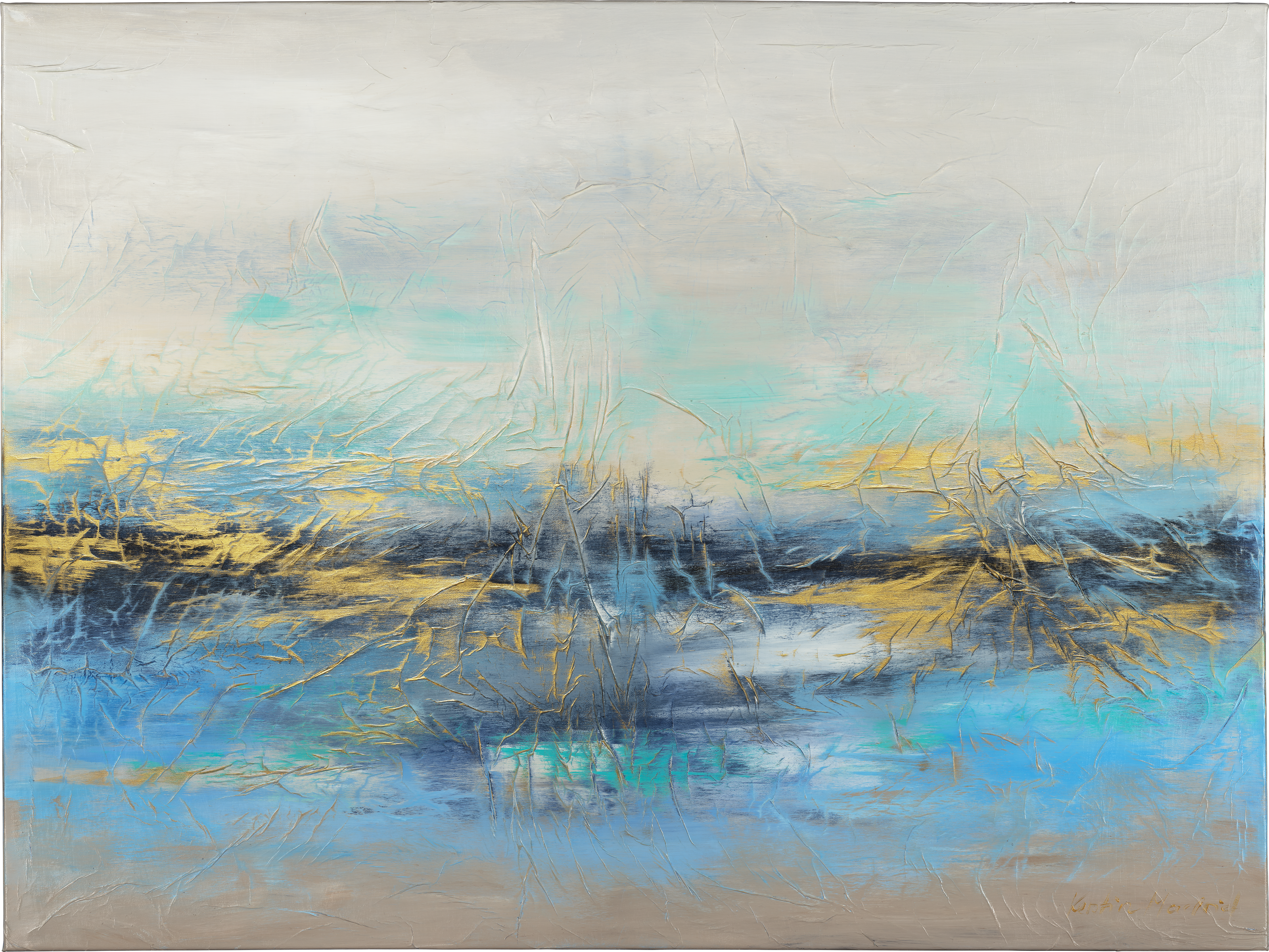
A carefully produced digital image provides the foundation for presenting your art in different ways. Explore the artwork viewer to see how much there is to discover in the details.
An original is sold, exhibited or becomes part of a collection. Careful digitisation while the artwork is accessible provides a foundation for later publications and authorised reproductions.
That might become an exhibition catalogue, a high-quality print or a limited edition. It may simply remain a digital record for now. You decide which direction suits your work.
Careful digital art reproduction provides a foundation for documenting and presenting artworks and preparing them for different publications. The images and files you need depend on your plans.
Present your work on your website, in exhibition catalogues or as high-quality prints. Artist portraits and glimpses of your practice can also be planned alongside the reproductions.
Use carefully produced artwork images for your sales communications, publications and print production. Photography, file preparation and output are tailored to your requirements.
Have selected artworks photographed for documentation, publication and digital interpretation. Requirements, file delivery and accompanying documentation are agreed together before the project begins.
Guided by the original
An artwork is more than a subject. Colour, drawing, surface, material effects and fine details shape its appearance. Digital art reproduction creates a high-quality digital foundation for documentation, publication and further output.
Capture conditions, lighting and camera equipment are tailored to each artwork and its intended use.
Colour management is part of every capture. Whenever the lighting changes, colour calibration and white balance are repeated as a fixed step in our quality assurance process.
The result is a high-quality digital master file that provides the basis for further, purpose-specific applications.
Services
Digital art reproduction brings capture, lighting, colour management, image processing and quality control together in a traceable workflow. The scope and capture methods are tailored to the artwork, its surface and its intended use.
Controlled photographic digitisation of paintings, drawings and other artworks, using a single capture or multiple images where required.
Lighting and capture conditions are adapted to the material and the way its surface appears. Depending on the task, this may include symmetrical lighting, cross-polarisation or raking light.
White balance, camera characterisation and a defined colour workflow form the basis of colour reproduction. Whenever the lighting changes, colour calibration and white balance are repeated before further artwork captures.
Images are processed and checked for geometry, colour and image artefacts. The master is approved within the agreed project workflow.
High-quality master files provide the basis for documentation, archiving and further agreed uses.
The approved master can be used to create tailored files for publication, fine art printing or digital presentation.
Explore artworks
An artwork makes an impression as a whole and comes alive in its details. Explore the surfaces, lines and colour transitions of these two works by Kerstin Nieto Madrid.
Kerstin Nieto Madrid · 120 × 90 cm
Use the buttons or slider to zoom. Drag with your mouse or finger to move around the image. Keyboard controls: plus/minus, arrow keys and Home. The small overview shows your position within the artwork.
Wählen Sie eine Detailstelle oder erkunden Sie das Werk frei.
Magnification reveals the image information available in the approved web file. Colour and material appearance also depend on your screen and viewing conditions.
DKR EDITION SUPPORT
Would you like to offer your artwork as a high-quality print or an edition? DKR Edition Support helps with technical preparation, coordination with your print provider and, if requested, professional review of a test print.
The DKR interface (HMI) and DKR Suite support a defined sequence of steps. Settings are documented in the HMI; the Photoshop working file (PSB) records the layer structure and saved processing stages. This allows the preparation of an artwork image to be traced using the available data.
Securely stored master files preserve the digital source for further agreed output. Reprocessing requires the necessary source files, documented settings and suitable software versions. A new photographic capture also requires the capture conditions to be agreed in relation to the original.
Before commissioning, we agree which files, processing stages and accompanying information are included, how long they are retained and which are delivered. The DKR Processing Recorder is being developed as an additional process documentation tool and is not yet a standard deliverable.
The following frameworks are among the relevant references when planning image quality requirements:
ISO 19264-1:2021 – Imaging systems quality analysis for reflective originals
FADGI – Technical Guidelines, 3rd edition (2023)
Metamorfoze – Preservation Imaging Guidelines, version 2.0 (April 2025)
Citing these references does not imply blanket conformity or a particular quality level. Before commissioning, we establish which requirements and checks are appropriate for your artwork and feasible for the project. Evidence relates to the checks expressly agreed and actually performed.
One possible collaboration model brings DKR together with a production and sales partner: I create the digital reproduction and prepare the agreed image files. The partner handles print production, framing and marketing of the product.
The digital master remains the source file. The partner receives the output files and usage rights agreed for their role. Printing process, material, format and review of a test print are agreed together.
For limited editions, the edition size, identification and approvals are agreed with the rights holders. Responsibilities for production, sales and customer service, together with remuneration and file sharing, are established before work begins.
How your digital image is created
Careful digital art reproduction begins long before the finished file. A coordinated setup, precise alignment and assessment on screen work together, with your artwork as the reference.
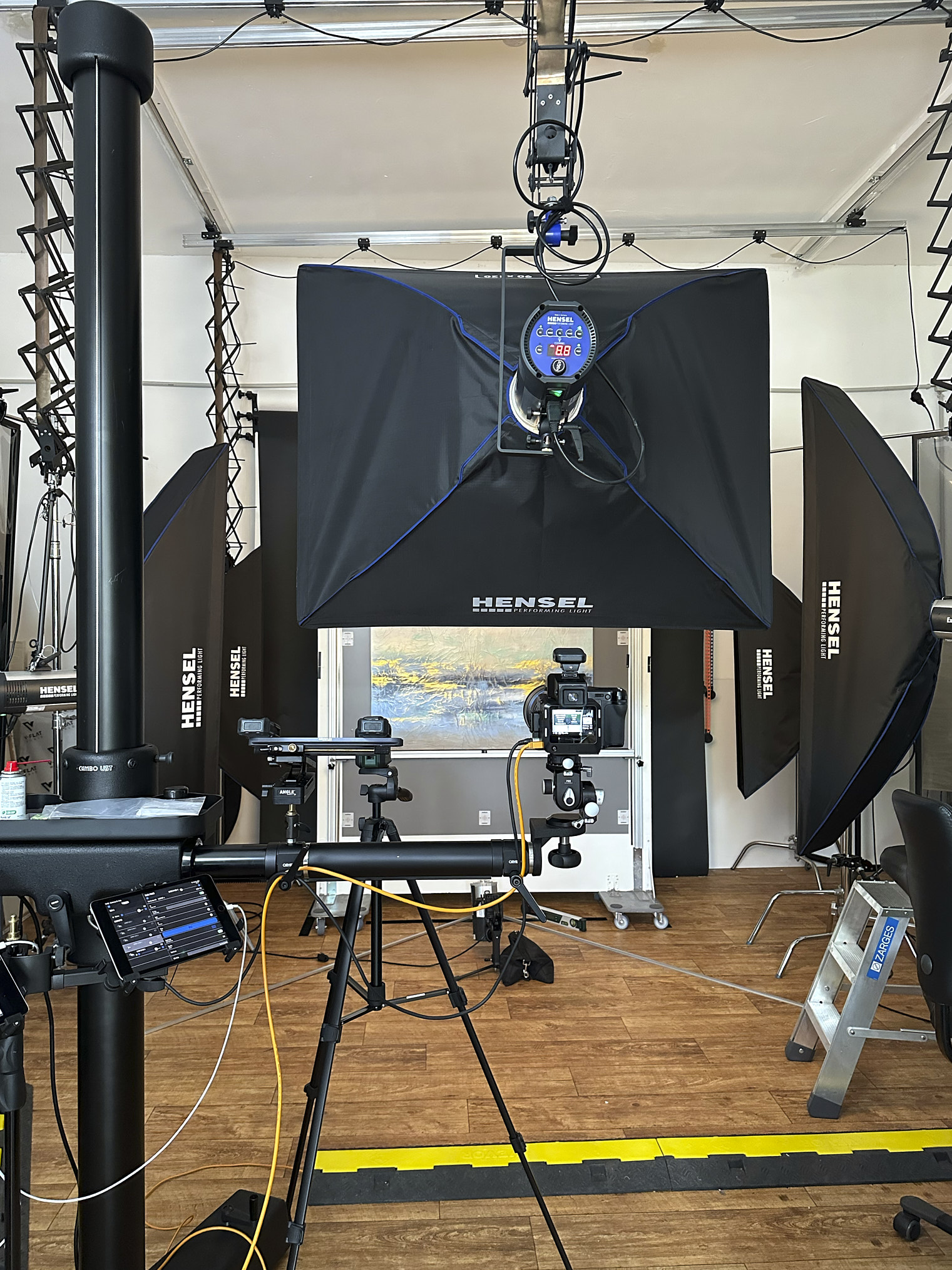
Artwork, camera, lighting and measuring equipment are set up together. Capture conditions are tailored to the artwork and its intended use.
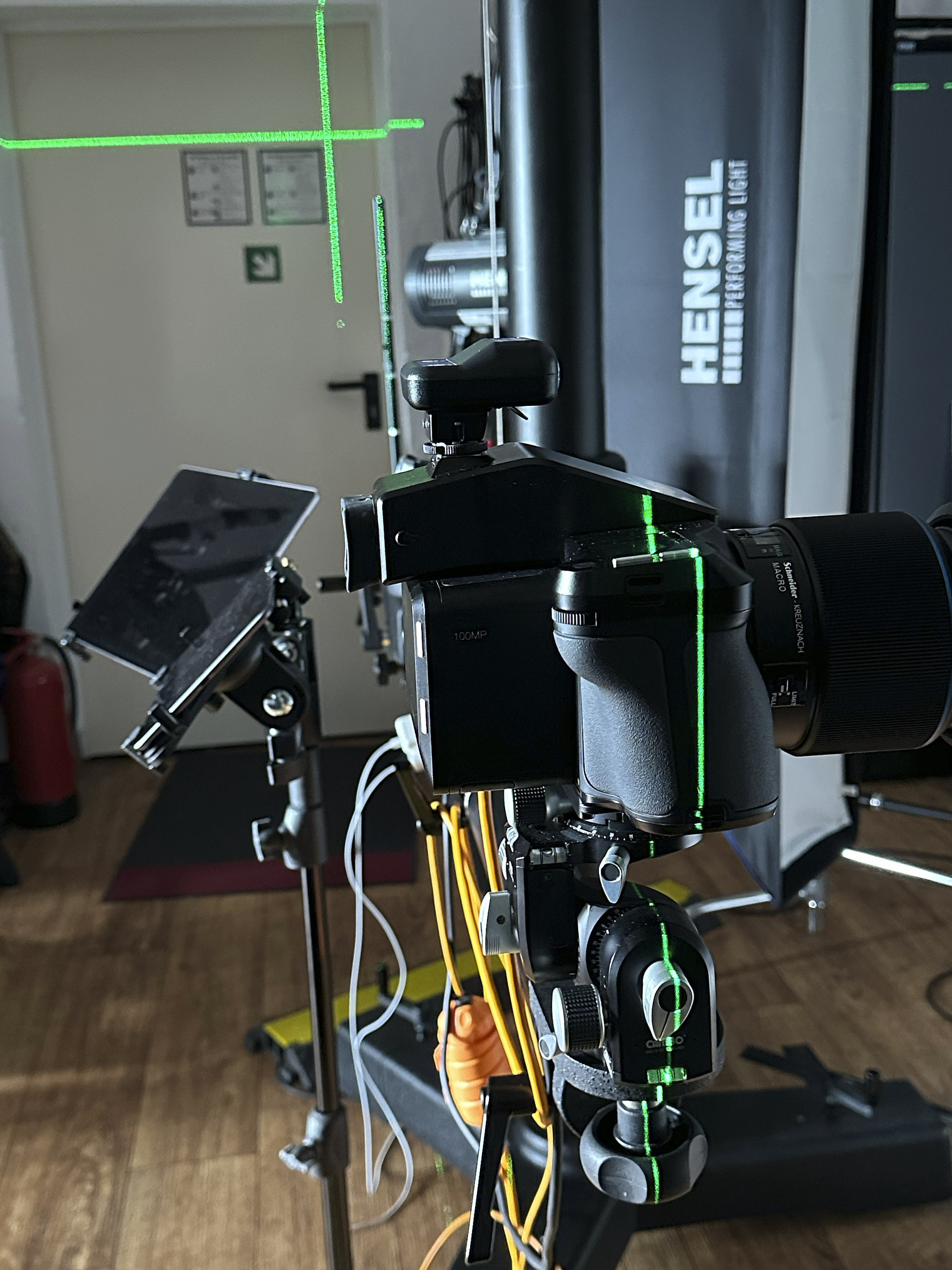
Precision begins before capture. Green laser lines help align the camera and stand carefully. Checking distances is also part of the preparation.
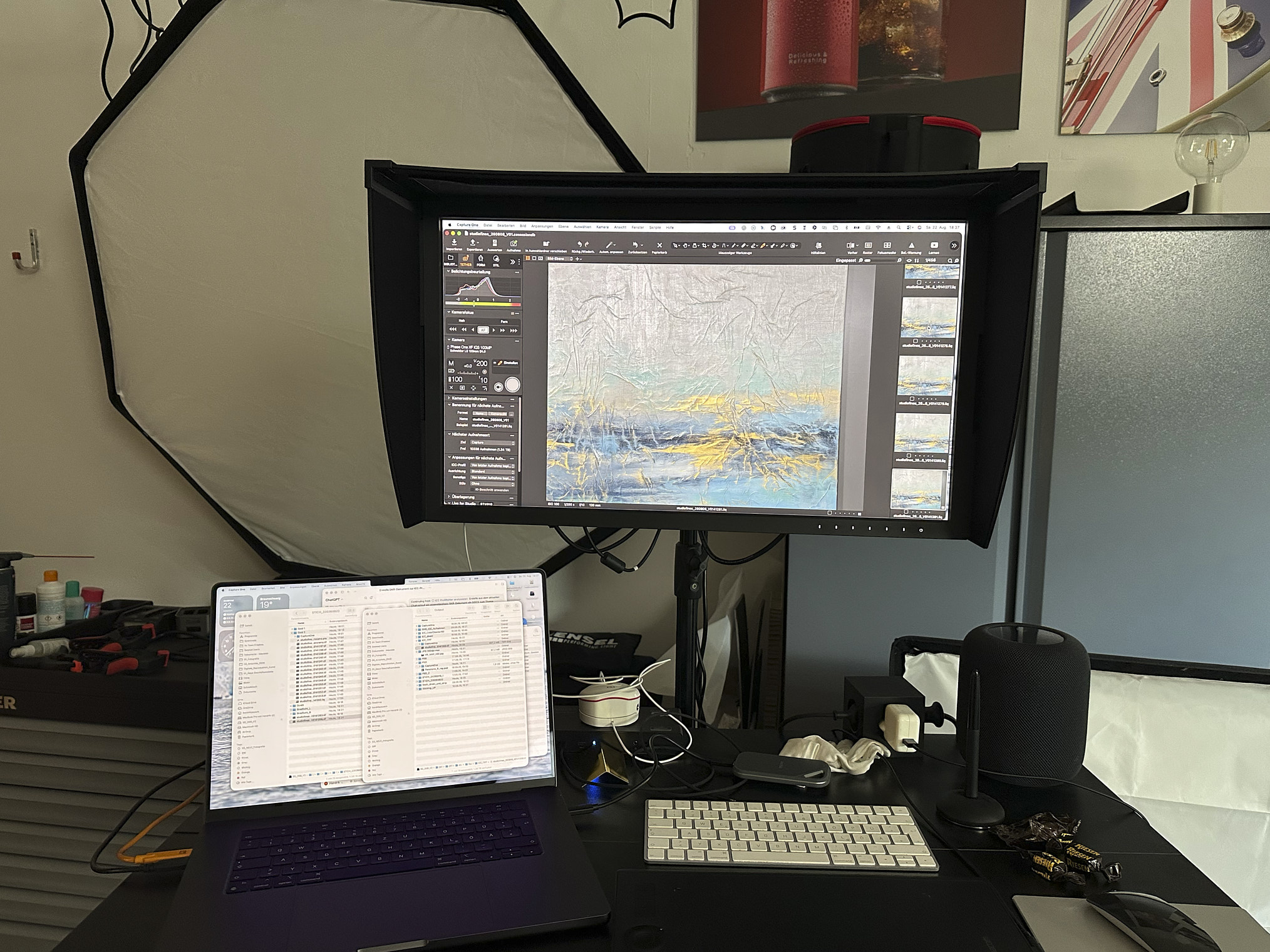
Colour, detail and possible image defects are assessed on screen. Technical checks and comparison with the original complement each other.
Collaborations and clients
Studio Finea is one of our clients and collaborators. The studio presents contemporary paintings by Kerstin Nieto Madrid as originals and limited editions.
A carefully produced digital image opens up new ways to present an artwork, from the first impression online to a carefully prepared print.
Studio Finea entdeckenMethod
Digital art reproduction is treated as a connected process. Requirements, the artwork, capture conditions, colour processing and the agreed quality checks are coordinated. The available settings and processing stages support traceability.
From the original artwork to a digital image: the film shows how purposeful photography, careful editing and assessment against the artwork work together.
Explainer film · 2:13 minutes · With sound
Eight steps show how photographic precision, specialist software and professional decisions work together – from the client brief to the approved digital master.
The overview identifies the systems, programs and handovers involved. Technical checks and assessment against the artwork complement each other. If corrections are needed, the image returns to processing.
Hendrik Peusch makes the final decision and personally approves the result. File delivery and usage rights are agreed for each project.
The steps: clarify the brief; plan the capture; prepare the equipment; photograph the artwork; process the images; assess quality; personally approve the result; prepare the digital master.
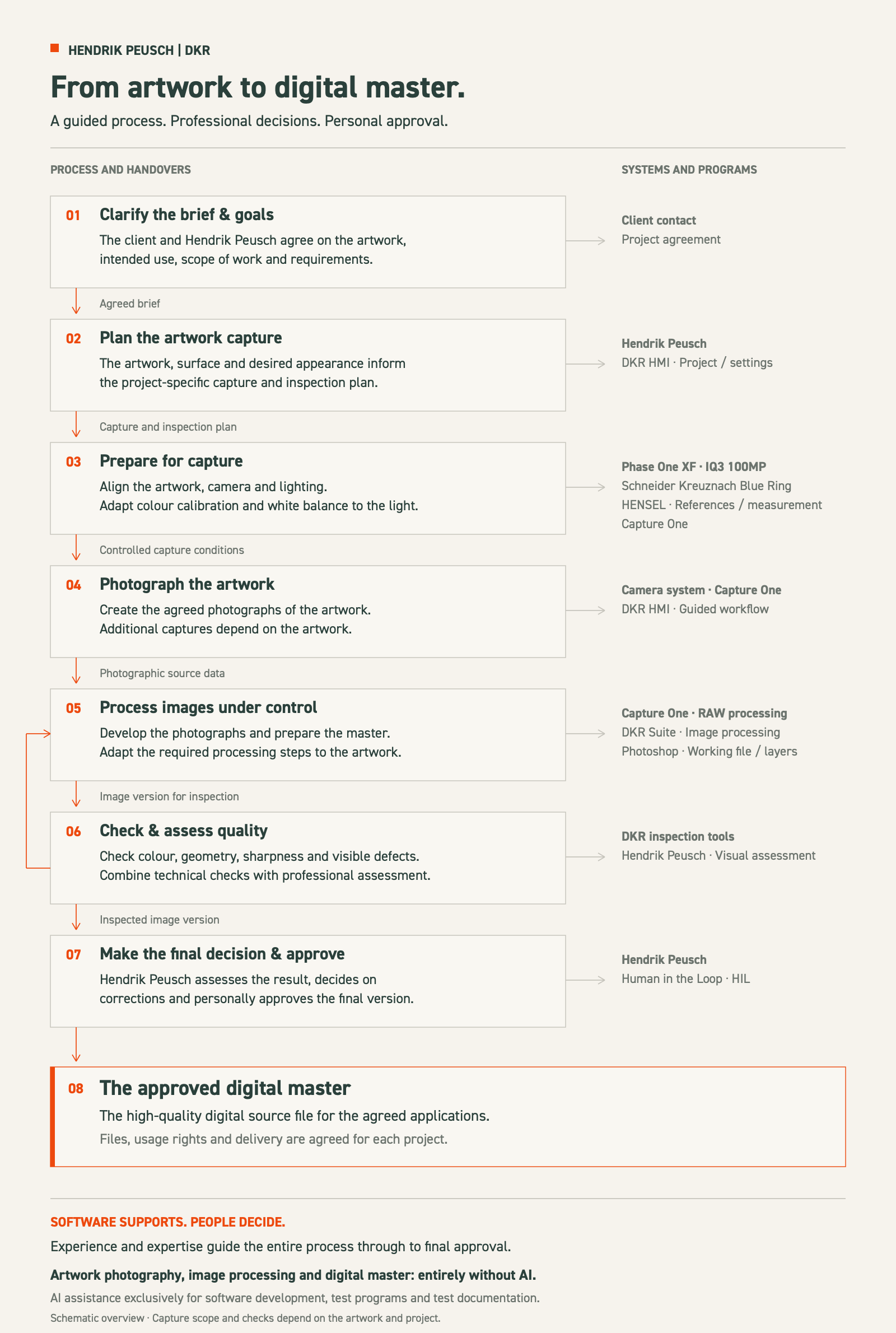
The DKR HMI and DKR Suite software, developed specifically for digital art reproduction (DKR), were created with the assistance of artificial intelligence. However, the photography and all processing of artwork images take place without AI. No image content is generated, added or altered by AI.
The DKR software processes the photographs using defined, rule-based procedures. The actual photographed artwork, with its colours, textures and details, remains the basis of the reproduction. The software supports the workflow, while many crucial steps require Hendrik Peusch’s experience and expertise. He adapts the processing to each artwork, assesses the results and decides which corrections are needed. Following a human-in-the-loop approach (HIL), he makes the final decision and personally approves the image data, including the digital master.
AI assists exclusively with software development: creating program code, developing test programs and preparing test protocols and reports. This includes software regression tests. After changes, these tests check whether existing functions continue to work as intended and document the test results.
AI assistance relates to developing and testing the tools. The artwork images and the resulting digital master are created and edited entirely without AI. Any subsequent editing of the digital master also takes place without AI.
We begin by considering the intended use, requirements and characteristics of the artwork. Material, surface, condition and particular capture requirements inform the planning.
Positioning, lighting, camera and references are prepared for capture. Relevant technical parameters are checked and adapted to the specific setup.
Photographic capture takes place under defined conditions. Different capture and lighting arrangements may be needed, depending on the artwork and the project goals.
Captured image data are developed and processed under controlled conditions. Colour management, geometry and other processing steps follow a traceable workflow.
Image data and processing are checked for relevant technical characteristics, including colour, geometry, sharpness, lighting uniformity and visible artefacts.
The approved digital master is linked to the artwork and processing stage. The project agreement defines which process information is documented and which details are delivered.
For digital art reproduction, I use a Phase One XF with an IQ3 100MP digital back, together with Schneider Kreuznach Blue Ring lenses. This medium-format system provides the foundation for photographing fine lines, surface textures and colour transitions in detail.
The IQ3 100MP supports colour capture with 16-bit colour depth. In the DKR workflow, this technical foundation is combined with controlled lighting, colour management and assessment against the artwork for careful reproduction of subtle colour nuances and tonal transitions.
Phase One technical specifications for the IQ3 100MP (PDF, opens in a new tab)
HENSEL flash equipment enables carefully arranged lighting. The lighting and capture conditions are adapted to each artwork, its surface and the intended use of the image data.
What matters is how everything works together: careful alignment of camera and artwork, controlled lighting, colour management and subsequent quality checks. The specially developed DKR HMI and DKR Suite support this structured workflow.
The artworks by Kerstin Nieto Madrid shown here reveal what matters: subtle transitions between blue, turquoise and light areas, alongside highlights and the visible shimmer of gold pigments. Colour, texture and reflection together define the character of the surface. Photographing them requires carefully coordinated lighting, capture and processing.
Explore these qualities in the existing magnified views. The image shows the material appearance under the chosen capture conditions; a single screen image can convey only part of the original’s sheen as it changes with light and viewing angle.
Quality and traceability
Digital art reproduction involves a controlled workflow that extends beyond capture alone. Colour, geometry and visible image defects are assessed to the extent agreed. Documented HMI settings and saved processing stages support professional review.
Camera, lighting, capture position and other relevant parameters are defined for each project and taken into account during subsequent processing.
White balance, camera characterisation and colour processing form part of a defined workflow that keeps colour information traceable.
Image data are checked for geometry, sharpness, transitions, visible artefacts and other relevant technical characteristics.
The digital master is the approved source for subsequent applications and is clearly identified within the agreed workflow.
Relevant steps and decisions are structured so that the origin, processing stage and approval of image data remain traceable.
In development · not yet published
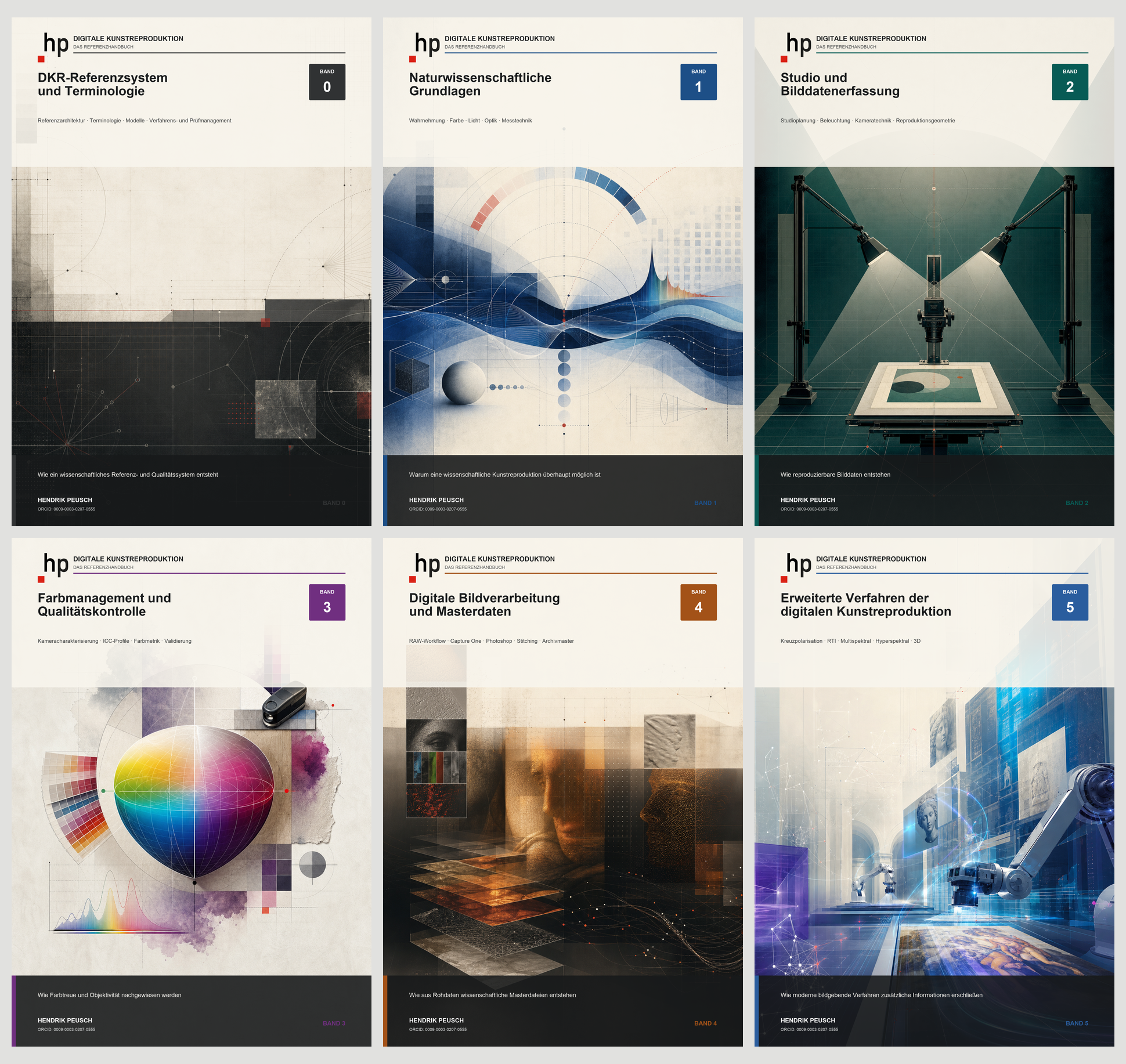
Alongside his practical work, Hendrik Peusch is developing a six-volume book series entitled “Digitale Kunstreproduktion” (Digital Art Reproduction). It examines the principles and methods of art reproduction from professional and scientific perspectives.
Volumes 0 to 5 connect the reference framework and terminology with natural science, studio capture, colour management, image processing and advanced methods.
For you as a client, this insight into the method highlights the questions that guide careful art reproduction: How are colour and detail captured? How can quality be assessed? And how can results remain traceable?
The book series is in development and has not yet been published.
Reference model
DKR-SRA describes a proposed framework for digital art reproduction. The model brings technical, visual and documentary steps together in a traceable structure.
Capture is the starting point. Artwork, lighting, camera and capture conditions are considered as connected process parameters.
Colour processing, geometry, image editing and other technical steps convert the captured data into a digital master under controlled conditions.
Checks and approval steps support the assessment of the image, its technical processing and its intended use.
Relevant process information is structured so that the processing stage, origin and approval of digital data remain traceable.
DKR-SRA is a proposed reference model, rather than a standard, certification or generally established industry framework.
Applications
Image requirements vary with the intended use. Output and file preparation are therefore tailored to each application.
High-quality digital images can support the documentation and long-term management of artwork reproductions.
The master can be used to create suitable files for catalogues, books and other publications.
For high-quality printing, image files can be prepared specifically for the chosen output process.
Optimised versions can be derived from the digital master for websites, digital presentations and other screen-based media.
The experience behind DKR
For many years, I have worked intensively in product and still-life photography. This calls for a close eye: for the effect of light, the appearance of surfaces, and the careful rendering of colour and detail.
Digital art reproduction grew out of this work as a specialist field. My photographic experience and my background as an electrical engineer come together in a structured approach – with your artwork as the reference.
Explore product and still-life photographyProject enquiry
Planning an art reproduction project involves the artwork, its size and surface, the intended use and practical arrangements. This information forms the basis for further discussion.
Contact us directly: hello@digitale-kunstreproduktion.com